10 Best Cashless Payment Device for Ev Charging Stations: Top Picks Compared
Managing EV charging payments can be harder than it should be. Drivers want a fast way to pay.
That is why many businesses are looking for the best cashless payment device for ev charging stations. This type of device helps make payments smoother at public and private charging points.
It is a smart choice for charging site operators, fleet managers, and property owners. It can also support a better user experience for drivers who prefer card, mobile, or contactless payments. This review looks at what the device offers, how it fits into daily use, and which features matter most.
This review looks at what the device offers, how it fits into daily use, and which features matter most. It also explains where it works well and where it may fall short, so you can decide whether it fits your charging setup.
Best Cashless Payment Devices for EV Charging Stations
| Image | Product | Price |
|---|---|---|
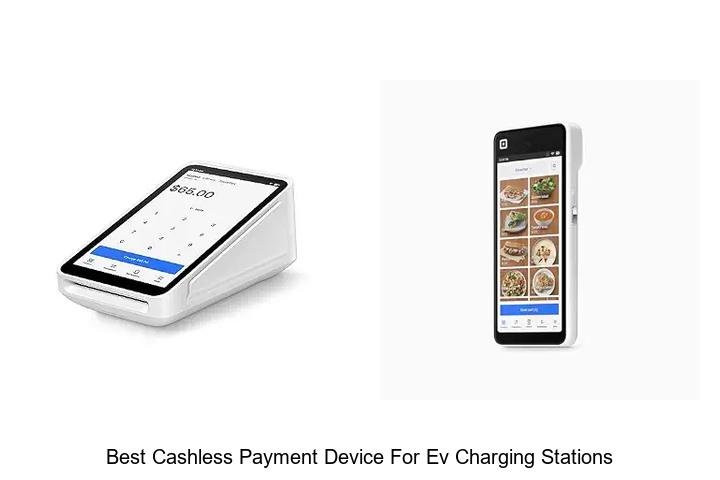
Pick 1  | Square Terminal Credit Card Machine | Check Price On Amazon |
Pick 2  | Square Handheld Portable POS Credit Card Machine | Check Price On Amazon |
Pick 3  | EV Range Commercial EV Charging Station | Check Price On Amazon |
1. Square Terminal Credit Card Machine
A compact terminal can simplify payment handling at busy charging sites. Square Terminal combines card acceptance, receipt printing, and mobile use in one unit. It accepts major credit and debit cards, giving operators broad payment coverage.
Chip cards process in about two seconds, helping lines move faster during busy periods. The built-in battery supports cordless use all day, which suits counters and roaming staff. Its small footprint and light weight also make placement easier in tight spaces.
The device is built for everyday business use, not a fixed checkout only. It can ring up sales at the counter or anywhere in the store.
That flexibility works well for EV charging stations with indoor kiosks or service areas. Money can arrive as soon as the next business day, which helps cash flow.
With no long-term contracts and one low rate, it offers a straightforward payment setup for operators that want fewer moving parts and simpler daily handling. It suits businesses that want one device for payments and receipts.
Pros
- Accepts major credit and debit cards
- Prints receipts from one compact device
- Works cordlessly with all-day battery life
Cons
- No mounted charging-station specific design listed
- No connectivity details provided in the data
- Not specialized for outdoor exposure
Who Should Buy It?
Operators who want one flexible payment terminal should consider it. It fits EV charging stations with indoor service counters, kiosks, or mixed-use retail spaces. The cordless battery helps staff move between locations.
Receipt printing and fast chip-card processing also suit busy check-in or payment points. Businesses wanting straightforward card acceptance without complex setup may find it a practical choice.
Key Specifications
| Specification | Details |
|---|---|
| Price | Not provided |
| Rating | Not provided |
| Payment Types | Major credit cards, debit cards |
| Connectivity | Not provided |
| Battery Life | All day |
| Portability | Cordless; 5.6 x 3.4 x 2.5 inches; 14.7 ounces |
| Display | Not provided |
| Receipt Printing | Yes |
| Offline Payments | Not provided |
| Compatibility | Accepts all major credit and debit cards |
| Mounting/Installation | Not provided |
Square Terminal supports major credit and debit cards, so it handles common customer payments easily. The built-in battery lasts all day, which helps when staff move around a site. Its compact size and light weight make it easy to carry or place on a counter. Receipt printing adds a physical record without needing extra equipment. For EV charging stations, that means a single device can manage payments and receipts at one point of service.
Its cordless design helps reduce clutter around payment areas and service desks. Chip cards process in about two seconds, which can speed up busy checkout moments. Money can arrive as soon as the next business day, helping business operations stay steady. The device can also be used at the counter or elsewhere in the store. That flexibility benefits operators who need payment handling in different spots without adding more hardware.
2. Square Handheld Portable POS Credit Card Machine
Portable checkout can feel easier with a device that fits in one hand. Square Handheld keeps payments moving while staying slim and light.
Built for restaurants, retail, beauty, and professional services, it can accept payments, take tableside orders, and scan barcodes anywhere. The pocketable shape makes it easy to carry during busy shifts. Water splashes and dust resistance add useful protection for daily work.
An optional protective case can help with accidental drops. The battery supports long shifts, and offline payments keep sales going when internet service drops.
It accepts major credit and debit cards with one simple rate and no long-term contracts. For EV charging stations, it suits portable field payments, mobile attendants, and pop-up service points. The built-in scanner and compact design help staff work quickly without extra gear.
It feels like a practical tool for teams that need mobility, speed, and simple payment handling.
Pros
- Lightweight body fits easily in hand or pocket
- Offline payments keep sales moving without internet
- Built-in barcode scanner adds useful flexibility
Cons
- No receipt printer built into the device
- Protective case is sold separately
- Not designed for fixed countertop use
Who Should Buy It?
Buyers needing portable field payments should look closely at Square Handheld. It suits staff who move between vehicles, charging bays, or customer locations. The compact size helps attendants carry it all shift.
Offline payments also help when network access is unreliable. It works well for teams that want card acceptance, barcode scanning, and mobile order taking in one device.
Key Specifications
| Specification | Details |
|---|---|
| Payment Types | Accepts all major credit and debit cards |
| Connectivity | Offline payments supported |
| Battery Life | Long-lasting battery |
| Portability | Slim, pocketable, lightweight; 7.04 x 3.12 x 0.62 inches; 2.11 ounces |
| Offline Payments | Supported |
| Compatibility | Restaurants, retail, beauty, and professional services |
| Mounting/Installation | No mounting required |
Square Handheld is built for mobile payment work, so the small size matters in daily use. At 7.04 by 3.12 by 0.62 inches, it stays slim enough for a pocket or palm. The 2.11-ounce weight also helps when staff carry it across a site. Accepting major credit and debit cards gives it broad payment coverage. Offline payments help keep transactions moving when internet access drops during busy periods.
The long-lasting battery supports longer shifts without frequent charging breaks. Water splash and dust resistance add practical protection in active environments. That can suit outdoor service areas, fast-moving teams, and locations where equipment gets handled often. The optional protective case gives extra drop protection. Since no mounting is required, setup stays simple. Teams that need portable checkout and barcode scanning can use it without extra installation steps.
3. EV Range Commercial EV Charging Station
Commercial charging needs often come down to payment control and reliable access. EV Range’s commercial station focuses on both, with app-based driver payments and access options for RFID or app use. It is built for revenue generation, with custom pricing, idle fees, monthly payouts, and usage reports.
The charger fits hotels, apartments, retail sites, restaurants, workplaces, resorts, and fleet yards. It uses a J1772 connector with a 25-foot cable and supports plug-in hybrids and electric vehicles.
Tesla drivers can use adapters typically supplied with the vehicle. The polycarbonate NEMA 4 enclosure carries IK10 impact resistance, making it suitable for marine, desert, and snow environments.
It mounts on a wall or pedestal, though the pedestal is not included.
Powered by EV Range software, the unit is network ready and OCPP-compliant. Drivers can pay through the EV Range app on web, iOS, or Android using a credit card.
Monthly revenue deposits and usage reports support operators who want a charging station that also functions as a business tool. With Energy Star and UL compliance, plus a 2 year manufacturer warranty, it suits commercial sites that need monetized access and straightforward management.
Pros
- Supports driver payments through app-based access
- Offers custom pricing, idle fees, and monthly payouts
- Weather-resistant enclosure suits demanding outdoor sites
Cons
- Pedestal mount hardware is not included
- Single port limits simultaneous charging capacity
- Tesla drivers need an adapter
Who Should Buy It?
Commercial property owners, fleet operators, and site managers should buy it. It fits businesses that want charging as a revenue source, not just a utility. Hotels, apartments, retail centers, restaurants, workplaces, and resorts can use its app payments, RFID access, and usage reporting.
It also suits locations that need outdoor durability and simple network management.
Key Specifications
| Specification | Details |
|---|---|
| Payment Types | Credit card via EV Range app |
| Connectivity | Network ready, OCPP-compliant |
| Portability | Wall or pedestal mountable |
| Compatibility | All plug-in hybrid and electric vehicles, with Tesla adapter |
| Mounting/Installation | Wall mount or pedestal mount, pedestal not included |
| Display | No display data provided |
| Offline Payments | No offline payment data provided |
The 240-volt, 32-amp setup points to steady Level 2 charging for commercial use. A single J1772 port serves most plug-in hybrids and electric vehicles. The 25-foot cable gives drivers room to park without awkward positioning. Polycarbonate housing and NEMA 4 protection help the unit handle wet, dusty, and high-impact locations. Energy Star and UL listing add extra confidence for sites that want a recognized electrical standard.
Network readiness matters when charging becomes part of daily business. OCPP compliance helps the station work within broader charging systems, while the EV Range app handles driver payment through web, iOS, or Android. Access control through RFID or app use supports private fleets and public locations. Monthly revenue deposits and usage reports help managers track activity. The wall or pedestal mounting choice works well for buildings, parking areas, and managed fleet spaces.
4. Sintron ST-004-F Payment Timer Power Box

Cashless charging control meets coin support in one compact unit. The Sintron ST-004-F suits unattended setups that need timed access. It combines mobile payment with coin acceptance through the ST-001 acceptor.
That acceptor can read up to eight coin types. Users scan a QR code on the screen, then pay in a browser.
No app is needed on their phone. The LCD can display custom text, such as store details or contact information.
That helps customers reach the operator quickly. The unit also supports OTA firmware updates for future changes.
Built for 16A use, it suits higher-load appliances and business equipment. The black housing and 2.4-inch LCD keep the design practical.
It feels aimed at operators who want flexible payment options, clear messaging, and remote convenience. For unattended cashless timer use, it offers a focused feature set with useful customization.
Pros
- Supports coins and mobile payments in one box
- QR browser payment needs no customer app
- Custom LCD text helps with customer communication
Cons
- Spec details for EV charging integration are limited
- Setup may suit technical users better
- No built-in receipt printer listed
Who Should Buy It?
Operators managing unattended charging or timed equipment should consider it. It fits locations needing coin backup and cashless mobile payments. The customizable LCD also helps with operator contact details.
Businesses that want remote-friendly payment collection may appreciate the QR browser flow. Buyers wanting a straightforward timer box with flexible payment methods will find it practical.
Key Specifications
| Specification | Details |
|---|---|
| Payment Types | Coins, mobile payment |
| Connectivity | Wi-Fi |
| Display | 2.4-inch LCD |
| Offline Payments | Coin payments supported |
| Compatibility | US/Canada electronic devices, up to 16A |
| Mounting/Installation | 3 prong 110V |
The payment setup combines coin acceptance with mobile checkout. Customers can scan a QR code and pay in a browser. That avoids app downloads and keeps the process familiar for phone users. The ST-001 acceptor reads up to eight coin types, which adds flexibility for mixed-use sites. A 2.4-inch LCD shows the payment prompt and custom text. For unattended locations, that helps users understand what to do quickly.
Wi-Fi connectivity and OTA updates support remote maintenance and firmware changes. The 3 prong 110V style fits US and Canada electrical setups, while the 16A rating suits higher-load equipment. That makes the unit practical for timed power control in commercial spaces. The customizable screen text can display store names or contact numbers. Operators who want simple customer instructions and adaptable payment handling may benefit most from these specifications.
5. Square Reader for Contactless and Chip (2nd Gen)

Low entry cost meets flexible payment acceptance in a compact reader. Square Reader for contactless and chip fits small charging setups that need simple card acceptance.
It accepts contactless payments, chip cards, Apple Pay, and Google Pay. Bluetooth connectivity keeps pairing straightforward, while the improved battery and offline payments help keep transactions moving. The reader works with Android and iPhone devices, so it suits mixed mobile setups.
Its customizable POS support can help operators organize sales without extra complexity.
Build quality feels practical for mobile use, with a lightweight 5.92-ounce design. The reader stays paired to your device and adds enhanced security plus fraud prevention tools.
Receipt printing is not included, so it fits digital-first workflows best. For operators who want a low-cost starter option, it offers core payment features without long commitments or monthly fees.
Pros
- Accepts tap, dip, Apple Pay, and Google Pay.
- Bluetooth pairing suits mobile charging station setups.
- Offline payments help during short connectivity gaps.
Cons
- No built-in receipt printing.
- Requires a compatible Android or iPhone device.
- Not ideal for larger counter-based stations.
Who Should Buy It?
Buyers who want an affordable starter reader for basic payment acceptance should consider it. It fits smaller EV charging sites, temporary installations, and operators using mobile devices for checkout. The device suits teams that need contactless, chip, and wallet payments without monthly fees or long contracts.
It works best where portability and quick setup matter more than advanced hardware features.
Key Specifications
| Specification | Details |
|---|---|
| Payment Types | Contactless payments, chip cards, Apple Pay, Google Pay |
| Connectivity | Bluetooth |
| Battery Life | Up to 24 hours offline payments |
| Portability | 5.92 ounces, battery powered |
| Receipt Printing | No |
| Offline Payments | Yes, up to 24 hours |
| Compatibility | Android, iPhone |
| Mounting/Installation | Portable, no fixed mounting listed |
The reader supports tap, chip, and mobile wallet payments in one device. Bluetooth connectivity keeps the setup wire-free and simple for mobile stations. Battery power also helps when outlets are limited near charging equipment. Offline payments can continue for up to 24 hours, which helps when a network drops briefly. Android and iPhone compatibility makes it flexible for teams using different phones or tablets at the point of sale.
These specifications suit operators who want fast deployment and low hardware overhead. A 5.92-ounce body is easy to carry between charging points or temporary service areas. The lack of receipt printing keeps the unit smaller and simpler, though digital receipts may be needed. Since no mounting hardware is listed, it works best as a handheld or portable checkout tool. Sites with light traffic benefit most from its straightforward setup.
6. Clover GO (3rd Generation)

A pocket-sized POS starter can make mobile payments far easier. Clover GO pairs with a smartphone through Bluetooth, keeping setup simple and compact.
Designed for small business use, it supports end-to-end security, custom tips, taxes, and digital receipts. The white unit weighs just four ounces, so it fits easily in a bag or drawer.
It works with the Clover POS operating system and connects through Bluetooth or Wi-Fi. Paperless receipts help reduce clutter, while employee permissions add useful control for shared teams.
A dock is sold separately, and the unit requires processing through SwyftPAY. For operators who want a light, mobile checkout tool, it offers practical features without extra bulk.
Pros
- Very light and easy to carry
- Bluetooth pairing keeps setup simple
- Supports tips, taxes, and digital receipts
Cons
- Requires processing through SwyftPAY
- Dock sold separately
- US businesses only
Who Should Buy It?
Mobile sellers and small operators who want a pocket-sized checkout tool should consider it. It suits teams that need Bluetooth pairing, digital receipts, and employee permissions in a compact unit. Businesses using smartphones for payment handling may appreciate the simple setup and light weight.
It fits best when portability matters more than a large countertop terminal.
Key Specifications
| Specification | Details |
|---|---|
| Payment Types | Card payments with digital receipt options |
| Connectivity | Bluetooth, Wi-Fi, 802.11n |
| Portability | 4 ounces; pocket-sized mobile use |
| Receipt Printing | Email and text receipts |
| Compatibility | Smartphone; Clover POS operating system |
| Mounting/Installation | Dock sold separately |
Bluetooth pairing lets the unit connect directly with a smartphone. Wi-Fi support adds another connection option for mobile checkout. The four-ounce weight keeps it easy to carry between locations. Paperless receipts mean customers can receive texts or emails instead of paper slips. That works well for fast service settings and small teams. The Clover POS operating system helps organize payments, employee access, and checkout tasks from one app-based control method.
These specifications suit operators who value light hardware and simple handling. The device can live in a pocket, bag, or small workspace. Digital receipts reduce paper handling, while customizable tips and taxes help match different sales setups. End-to-end security supports payment handling from swipe to completion. Because a dock is sold separately, users can keep the setup minimal or expand it later. It fits businesses that want mobility without sacrificing basic checkout controls.
7. Clover GO Mobile POS System

Small businesses often need card acceptance without bulky hardware. Clover GO offers a pocket-sized mobile POS that pairs with a smartphone over Bluetooth.
Its main appeal is simple mobility, plus support for tips, taxes, and digital receipts.
The Clover GO Mobile POS System is built for compact, flexible payment use. It connects wirelessly to a mobile device and works with any smartphone.
That makes setup straightforward for staff who already use phones for daily operations. End to end security protects card data during the payment process. Custom tip percentages and multiple tax rates help with service charges and sales calculations.
Email and text receipts reduce paper use and speed up checkout. Multiple employee permissions also help owners limit access. At 5.6 ounces, it stays easy to carry between locations.
It suits budget-minded operators who need portable payment handling with basic business controls.
Pros
- Pairs wirelessly with any smartphone
- Supports tips, taxes, and digital receipts
- Very light and pocket friendly
Cons
- Requires processing through Powering POS
- US-based businesses only
- No built-in display or printer
Who Should Buy It?
Clover GO suits small operators that want a low-bulk mobile payment option. It works well for budget-conscious businesses that already use smartphones for daily tasks. The system fits teams that need portable card acceptance, basic receipt delivery, and employee permission control.
It is also a practical choice for US-based businesses using Powering POS processing.
Key Specifications
| Specification | Details |
|---|---|
| Payment Types | Card payments |
| Connectivity | Bluetooth with mobile device |
| Portability | 5.6 ounces; pocket-sized |
| Receipt Printing | Email or text receipts |
| Compatibility | Any smartphone |
| Mounting/Installation | No fixed mounting; mobile use |
Clover GO connects wirelessly to a smartphone through Bluetooth. That setup suits quick payment handling without extra counter hardware. Its pocket-sized build makes it easy to carry during busy shifts or between service areas. Email and text receipts replace printed slips for customers who prefer digital copies. Because it works with any smartphone, staff can use familiar devices instead of learning new equipment.
The light weight supports frequent carrying and simple daily use. Custom tips and multiple tax rates help with sales that need flexible charge settings. End to end security protects payment data during transactions, which matters for customer trust. Multiple employee permissions help owners control access across staff roles. The system fits smaller teams that want portable payment handling with basic administrative control and minimal setup demands.
8. Verifone e355 Payment Terminal Stand

A compact terminal stand can simplify payments at busy charging points. The Verifone e355 Payment Terminal Stand focuses on secure placement and easy access.
It uses a tabletop design with adjustable length, helping it fit different desk sizes. The 180 degree swivel rotation gives users flexible positioning during payment sessions.
That movement can make shared checkout points feel easier to manage.
The black finish keeps the setup looking clean and professional. Its integrated charging station adds extra convenience for smartphone use. The clip holder fastening type helps keep the terminal in place.
Built for smartphone compatibility, it suits payment workflows that rely on mobile devices. The tower form factor keeps the footprint controlled on counters or desks. It suits stations that want a fixed payment point with simple access and tidy presentation.
Build quality appears focused on practical daily use rather than flashy styling. The adjustable stand length helps match different table setups and installation spaces. Swivel rotation can reduce awkward hand positions during customer use.
That matters when payment devices face frequent interaction throughout the day. The tabletop mounting type also supports a stable arrangement on flat surfaces.
It fits operators who want a straightforward stand setup for charging station payment handling.
Value comes from combining device support and charging convenience in one stand. The integrated charging station may help keep compatible smartphones ready for use. Since it works with smartphones, it suits mobile payment environments well.
Businesses with limited counter space may appreciate the compact tower style. It fits operators who want a neat terminal presentation, easier access, and a practical mounting solution.
Pros
- 180 degree swivel rotation improves access.
- Adjustable length fits different desk sizes.
- Integrated charging station adds convenience.
Cons
- Limited to smartphone compatibility.
- No receipt printer included.
- Tabletop mounting only.
Who Should Buy It?
Operators who want a fixed terminal stand for charging station payments should consider it. It suits desks, counters, and compact payment areas where positioning matters. The swivel feature helps staff and customers access the terminal more easily.
Businesses using smartphone-based payment setups may like the integrated charging station. It works best for teams that value tidy placement and simple tabletop installation.
Key Specifications
| Specification | Details |
|---|---|
| Portability | Tabletop stand with adjustable length |
| Compatibility | Smartphones |
| Mounting/Installation | Tabletop, clip holder fastening |
The adjustable stand length helps the terminal fit different desk sizes. That matters when charging stations have varying counter widths or layouts. The 180 degree swivel rotation lets users angle the terminal for easier access. The black finish gives it a clean, professional appearance. An integrated charging station adds convenience for smartphone use, especially in shared payment areas where devices need regular power support.
These features make the stand practical for everyday payment setups. The tabletop mounting type keeps the terminal positioned on a flat surface. The clip holder fastening type helps hold the device in place during use. Since it works with smartphones, it suits mobile payment workflows. Operators who want a stable, tidy terminal station may benefit most from the compact tower form and flexible rotation.
9. ChargePoint HomeFlex EV Charger
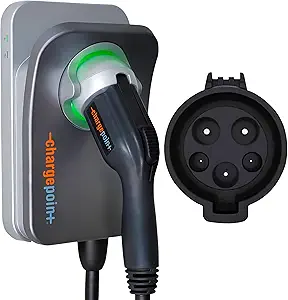
ChargePoint HomeFlex brings smart home charging into a compact, hardwired package. It suits drivers who want app control, reliable charging, and broad EV compatibility.
The HomeFlex Level 2 charger supports J1772 connectors for non-Tesla vehicles and can work with Tesla using an adapter. It delivers up to 45 miles of range per hour, depending on the vehicle, and charges far faster than a standard 120V outlet.
The unit includes WiFi-based smart features through the ChargePoint Mobile App. Users can manage reminders, find stations, connect smart home devices, and review charging data. Its UL-certified build supports indoor or outdoor installation by an electrician.
The cold-resistant cable adds practical durability for changing weather. Adjustable charging from 16 to 50 amps gives flexibility for different setups. It fits drivers who want convenient home management and dependable daily charging.
Pros
- App control simplifies daily charging management
- Fast Level 2 charging suits home use
- Indoor and outdoor installation options
Cons
- WiFi is needed for certain features
- Tesla drivers need an adapter
- Requires professional hardwired installation
Who Should Buy It?
Homeowners who want smart charging control should consider it. It fits drivers who value app-based scheduling, charging data, and station lookup features. The hardwired setup suits permanent home installations better than portable use.
Non-Tesla EV owners get direct compatibility through the J1772 connector. Tesla owners can still use it, but need an adapter.
Key Specifications
| Specification | Details |
|---|---|
| Connectivity | WiFi |
| Compatibility | J1772 for non-Tesla EVs; Tesla requires adapter |
| Mounting/Installation | Hardwired; indoor/outdoor installation by electrician |
| Portability | Not portable |
The HomeFlex charger uses WiFi and the ChargePoint Mobile App for control. That means you can check charging data, set reminders, and access station information from a smartphone. Its J1772 connector supports most non-Tesla EVs directly. Tesla drivers need an adapter for use. The hardwired design points to a fixed home setup, not a plug-in unit. Indoor and outdoor installation options make it useful for garages, driveways, and other permanent locations.
A 50A hardwired charger with adjustable 16 to 50 amp settings gives useful flexibility. The unit supports up to 45 miles of range per hour, depending on the vehicle. That speed helps daily drivers recover range overnight more easily. The UL-certified build and cold-resistant cable add confidence for long-term home use. Since WiFi powers certain functions, users with stable internet get the most from the smart features. It suits homeowners who want regular, app-managed charging.
10. Nayax VPOS Touch Payment Reader

Unattended payment points need hardware that feels dependable every day. The Nayax VPOS Touch focuses on cashless acceptance, remote control, and physical toughness.
It accepts credit and debit cards, NFC wallets, mobile wallets, and QR codes. That broad support helps reduce payment friction at self-service locations.
The 2.4-inch color touchscreen adds multi-language support and voice prompts. Those features can help users complete payments without staff help.
Its build suits heavy-duty use. Dragontrail glass, shock detection, and an IP55 rating support harsher public settings. The unit also offers real-time telemetry, so operators can monitor sales, inventory, and performance remotely.
Marketing tools such as loyalty programs, discounts, and punch cards add extra flexibility. Plug-and-play installation and remote software updates simplify deployment. The device suits operators who need durable unattended payments and remote visibility.
Performance should feel straightforward for mixed customer groups. Swipe, contact, and contactless methods cover most payment preferences.
MDB and pulse compatibility also widen deployment options across unattended machines. The compact size and light weight help during mounting and maintenance.
For operators managing charging kiosks, vending points, or other unattended stations, it offers a practical mix of payment reach, monitoring tools, and physical durability.
Pros
- Supports cards, NFC wallets, and QR codes.
- Durable IP55 housing with Dragontrail glass.
- Remote telemetry helps track sales and inventory.
Cons
- No receipt printer is listed.
- Battery life is not provided.
- Installation may still need compatible hardware.
Who Should Buy It?
Operators who need a cashless reader for unattended stations should consider it. It suits EV charging locations, vending setups, arcades, and similar self-service points. The device works well for sites that need card, wallet, NFC, and QR payments.
Buyers who value remote monitoring, multi-language support, and rugged construction will get the most use from it. It fits teams that want fewer on-site payment issues.
Key Specifications
| Specification | Details |
|---|---|
| Payment Types | Credit/Debit cards, mobile wallets, NFC, QR codes |
| Connectivity | MDB & Pulse compatible |
| Portability | 8.1 oz; compact 3.3 x 1.78 x 4.1 inches |
| Display | 2.4-inch color LCD with multi-language support and voice prompts |
| Receipt Printing | Not listed |
| Offline Payments | Not listed |
| Compatibility | Vending, arcade, and unattended machines |
| Mounting/Installation | Plug and play; remote software updates |
The listed payment types matter because customers can pay many ways. Cards, mobile wallets, NFC, and QR codes reduce the chance of a failed transaction. For EV charging stations, that flexibility helps different drivers complete payment quickly. The 2.4-inch color LCD also helps users follow prompts clearly. Multi-language support and voice prompts can guide people through the process, especially where quick interaction matters and staff may not be nearby.
MDB and pulse compatibility help the reader fit more unattended equipment. That makes it easier to place across self-service sites with different hardware needs. The compact size and light weight can simplify mounting and service visits. Dragontrail glass, shock detection, and IP55 protection support busy public use. Remote telemetry and software updates help operators monitor activity and maintain control from afar, which suits high-traffic charging areas and other unattended locations.
Best Cashless Payment Devices for EV Charging Stations: A Buyer’s Guide
Payment method compatibility
Modern EV charging stations depend on payment devices that can handle several transaction methods without slowing the customer down or creating service gaps. EMV chip and contactless card support is essential because it allows drivers to pay securely with the most widely used bank cards, while mobile wallet and NFC acceptance makes the experience faster and more convenient for users who prefer tap-to-pay with a phone or smartwatch.
It is also smart to verify QR code and app-based payment options, since these methods can support flexible checkout, remote account management, and easier updates as payment habits continue to evolve. A unit that covers all three areas helps charging operators reduce friction at the point of use, serve more customers, and avoid costly replacements later.
Network connectivity and reliability
Reliable payment processing depends on stable data links, because every tap, card swipe, or mobile-wallet approval must reach the network quickly and securely. A device with cellular, WiFi, and Ethernet support gives site operators flexibility in different installation environments, from indoor garages to remote outdoor chargers, while also providing backup paths if one connection drops. Offline transaction handling is equally important, since temporary outages should not stop drivers from paying or force a complete shutdown of the station.
It is also wise to review signal strength and uptime performance, because weak reception and frequent downtime can slow transactions, frustrate users, and reduce revenue. A unit built for dependable operation across multiple networks helps keep charging sessions smooth, secure, and consistently available.
Security and compliance features
PCI compliance requirements are the foundation of any reliable cashless payment setup for EV charging stations, because they help ensure cardholder data is handled in line with industry standards and reduce the risk of costly violations. A device that supports encryption and tokenization adds another layer of protection by converting sensitive payment details into unreadable code, making intercepted data far less useful to attackers. Just as important, strong fraud prevention and tamper protection features can block suspicious transactions, detect unauthorized access, and protect the unit from physical interference in public charging environments.
Just as important, strong fraud prevention and tamper protection features can block suspicious transactions, detect unauthorized access, and protect the unit from physical interference in public charging environments. Together, these safeguards help operators maintain trust, support smooth transactions, and keep the payment system secure over the long term.
Integration with ev charging hardware
Integration with EV charging hardware starts with ensuring the payment unit works smoothly with the chargers already installed on-site, because mismatched systems can lead to failed transactions, delayed sessions, or extra retrofit costs. A reliable setup should also support the backend software used to manage sessions, user accounts, and reporting, with OCPP compatibility helping the device communicate properly across different charger brands and control platforms.
Just as important, metering and billing synchronization must be accurate so that energy delivered, session length, and customer charges all match in real time, reducing disputes and simplifying revenue management.
- Compatibility with existing chargers: prevents integration issues and avoids unnecessary hardware replacement.
- Backend software and OCPP support: helps the device connect with management systems and remain flexible for future platform updates.
- Metering and billing synchronization: keeps usage data aligned with payment records for accurate charging and accounting.
Installation and maintenance factors
Reliable network access and room for future hardware add-ons can determine how well a payment device performs in an EV charging site over time. A unit installed outdoors needs weather-resistant casing, sealed ports, and stable operation in heat, rain, and dust, while indoor setups may prioritize compact design and simple access for servicing. Installation is easier and less disruptive if the device supports straightforward wiring, clear mounting options, and compatibility with existing power and communication infrastructure. Features such as remote diagnostics and over-the-air firmware updates are equally valuable because they reduce downtime, allow issues to be identified quickly, and keep the system secure without frequent on-site visits.
Features such as remote diagnostics and over-the-air firmware updates are equally valuable because they reduce downtime, allow issues to be identified quickly, and keep the system secure without frequent on-site visits. A device that can adapt to new peripherals or software functions also helps the charging station stay efficient as payment methods and operational needs evolve.
Cost, fees, and scalability
Upfront hardware and installation costs can shape the long-term value of a cashless payment setup for EV charging sites, especially since fee structures and network requirements differ widely between models.
- Device and installation costs: Some units need only a simple retrofit, while others require new wiring, networking hardware, or enclosure upgrades that increase initial spending.
- Transaction fees and processing rates: Small per-payment charges and monthly service fees can have a major impact on profit margins, so it helps to compare the full payment schedule, not just the device price.
- Multistation and future growth support: A system that can manage several chargers and scale across new locations reduces replacement costs later and makes it easier to add stations without rebuilding the payment infrastructure.
Cost, fees, and scalability should be evaluated together, since a lower-priced unit can become expensive over time if it has high processing costs or limited support for additional chargers.
Handy Add-ons for Easier EV Payments
A cashless payment device for an EV charging station works best when it fits the rest of the setup. A few small add-ons can make daily use smoother for drivers and easier for site owners.
Start with a weatherproof mount or enclosure. Outdoor charging points face rain, sun, dust, and rough use. A good mount helps protect the card reader or payment terminal and keeps it easy to reach.
A clear cable manager can also help. It keeps cords tidy and reduces wear from dragging or bending. This matters at busy stations where many people use the charger each day.
Many operators also add a printed sign or screen decal with simple instructions. Short steps help first-time users pay faster. Clear pricing signs can also reduce confusion before a session starts.
Power backup is another useful add-on. A small battery backup or surge protector can help protect the payment device from power loss and electrical spikes. That can reduce downtime and limit repair needs.
For sites with more than one charger, remote monitoring tools can save time. These tools can show whether a payment unit is online, reporting errors, or ready for use. That makes basic support easier without visiting the site as often.
- Weatherproof mount or enclosure
- Cable organizer
- Clear user signage
- Surge protector or backup power
- Remote status monitoring
Before buying accessories, check that they match the exact payment device model and the station’s outdoor rating. A small accessory that fits well can make the whole payment setup feel much simpler for everyone.
FAQ’s
What Is The Best Cashless Payment Device For Ev Charging Stations?
The best cashless payment device for EV charging stations is typically a contactless card reader that supports tap-to-pay, mobile wallets, and EMV payments. For the best experience, choose one that is rugged, PCI-compliant, and integrated with your charging network software.
Which Cashless Payment Systems Work With Most Ev Charging Stations?
Most EV charging stations work with contactless credit and debit cards, mobile wallets like Apple Pay and Google Pay, and dedicated charging network apps or RFID cards. Compatibility can vary by station, so it’s best to check the charger’s accepted payment methods before plugging in.
What Features Should I Look For In A Cashless Payment Device For Ev Chargers?
Look for a device that supports multiple payment methods, including contactless cards, mobile wallets, and QR codes, plus fast transaction processing and reliable connectivity. It should also be secure, weather-resistant, and easy to integrate with your charger and payment system.
How Do Cashless Payment Devices Improve The Ev Charging Experience?
Cashless payment devices make EV charging faster and more convenient by letting drivers pay instantly without needing cash, apps, or membership cards. They also reduce wait times and simplify the charging process, making stations easier to use for everyone.
What Are The Costs And Installation Requirements For Cashless Payment Devices At Ev Charging Stations?
Costs vary widely, but cashless payment devices for EV charging stations typically range from a few hundred to a few thousand dollars per unit, plus possible monthly software, processing, and maintenance fees. Installation usually requires a compatible charger, reliable internet or cellular connectivity, secure mounting, and electrical integration, often done by a qualified technician.
Final Verdict
The best cashless payment device for ev charging stations depends on how the site will be used. For a flexible, all-purpose setup, the Square Terminal Credit Card Machine is the best overall pick because it combines a familiar checkout experience with broad payment support and a simple form factor. If cost is the main concern, the Square Reader for Contactless and Chip (2nd Gen) is the best value choice for operators who want a low-cost starter option without overbuying features.
For higher-traffic or tougher unattended environments, the Nayax VPOS Touch Payment Reader is the best premium pick, thanks to its purpose-built unattended design and commercial focus. The Sintron ST-004-F Payment Timer Power Box is the best fit for unattended cashless timer setups where timed access matters more than a full payment terminal. In short, choose Square Terminal for general use, Square Reader for budget-conscious sites, Nayax for demanding unattended deployments, and Sintron for timer-based charging control.
Choose Square Terminal for general use, Square Reader for the lowest-cost start, Nayax for heavy-duty unattended charging, and Sintron for timer-based access control.